School management, made simple
School management software
The school office, without the registers.
Admissions, fees, attendance, exams and notices to parents, all in one place. The office stops copying the same names into five different books, and teachers and parents use it on their phones.
Runs in any browser, so there is nothing to install. If you get stuck, message us on WhatsApp and a person will answer.
See Skolynx with your school's workflow
Join 500+ institutions already running on Skolynx. We'll tailor the demo to your modules.
Schools across India run on Skolynx
Why schools switch
Fewer registers, fewer spreadsheets, fewer phone calls
Most schools come to us with fee books in one cupboard, attendance in another and notices spread over five WhatsApp groups. Skolynx keeps it in one place.
Running within days
Not a whole term. We help you bring in your students and fee structure, and show your staff around.
Each person sees their part
Teachers see their classes, the accountant sees fees, and parents see their own child. Nothing else.
Works on any phone
Admins, teachers, students and parents can use it on a laptop or a phone, straight from the browser.
Today’s numbers, today
Attendance, fees and results update as they are entered. No waiting for a month-end report.
Backed up and online
Your records are backed up regularly and you can open them from anywhere. 99.9% uptime SLA.
People you can call
Phone, email or WhatsApp, from the first day of setup to everyday questions.
A school day
One ordinary day, hour by hour
What Skolynx does at each point in a normal school day, from the gate in the morning to the principal’s desk in the evening. The names and figures on the cards are made up.
- 7:45 am
Staff
Staff sign in at the gate tablet
The tablet at the entrance recognises each teacher’s face and notes the time. By the first bell the office already has the list of who is in, who is running late and who is on leave.
- Face check-in on any tablet or laptop
- Late arrivals and leave in the same list
Staff check-in · Today42 of 45 inNVNeha Verma · Maths7:41 amRJRahul Joshi · Science7:44 amSKSana Khan · English8:06 am · lateARArjun Rao · PEOn leave - 8:20 am
Attendance
The class teacher takes attendance
Mark the whole class present, then tap the two or three who aren’t there. Monthly and yearly percentages add themselves up, so nobody has to total a register at the end of term.
- Whole class present in one tap
- Late and excused kept separate
Class VI-B · Attendance34 of 36 presentAKAarav KumarPADSDiya SharmaPAFAFarhan AliPAMIMeera IyerPASaved for Thursday · 8:21 am - 9:30 am
Communication
A notice goes out to Class VI
Choose the whole school, one class or only the teachers. Parents get it as a notification on their phone, and you can see how many of them have opened it.
- Send to a class, a group or everyone
- See how many parents have read it
Notice boardClass VIScience exhibition on Saturday
Students to report by 9 am in school uniform…
Sent to 74 families · 61 have read it - 10:30 am
Fees
Fee reminders go out on WhatsApp
Parents get the exact amount due and can pay by UPI or card through Razorpay. Cash and cheques are still entered at the counter, and every payment gets a numbered receipt.
- Online payment through Razorpay
- Concessions, late fees and cheques handled
Dear parent, Term 2 fees of ₹18,500 for Aarav Kumar (VI-B) are due on 10 Dec. You can pay online from the parent app.Receipt RCPT-2026-0812Paid₹18,500
Tuition fee₹15,000Transport₹3,500Paid byUPI · 10:14 amReceipt sent to the parent app - 12:40 pm
Admissions
Calling back yesterday’s enquiries
Walk-ins and phone calls go into one list, and the menu shows how many follow-ups are due today. When a family says yes, the enquiry becomes an admission without typing it all in again.
- Follow-ups due today, counted in the menu
- Enquiry to admission in one step
Admission enquiries2027–2824
New
7
Follow-up today
18
Admitted
KMKabir Mehta · Class ICall todayINIsha Nair · NurseryVisit on Sat - 2:15 pm
Transport
Someone checks the bus papers
Fitness, insurance and permit dates are kept for each bus, along with the drivers’ licences. Anything close to expiring shows up on the dashboard weeks before an inspection.
- Routes, stops and seats for each bus
- Transport fees by stop
Fleet papers3 need attentionBus 4 · InsuranceExpired 2 days agoBus 7 · FitnessIn 12 daysBus 2 · PermitIn 21 daysBus 9 · All papersValid - 3:30 pm
Exams
Marks in, report cards out
Teachers enter marks for their own subjects. Grades, co-scholastic areas and the weighted final result are worked out for you, and report cards print in your school’s own layout.
- Your school’s own report card design
- Re-evaluation requests handled in the app
Report card · Term 1Class VI-BAKAarav Kumar
Roll 04
MathematicsA1 · 94ScienceA2 · 88EnglishA1 · 91Art educationGrade AResults published · 3:42 pm - 5:00 pm
Management
The principal looks over the day
Attendance, fees collected, dues sorted by how late they are, pending leave and coming exams, all on one screen. Nobody has to be asked for the numbers on WhatsApp.
- Fee dues grouped oldest first
- Alerts for leave, exams and transport
Today at a glanceThursdayAttendance
94.6%
Fees collected
₹2.4L
Pending leave
3
Overdue 60+ days
₹86k
6:00 pm. The gate is locked. Everything above happened in one app, so tomorrow starts from the same records instead of a pile of registers.
Product tour
Look around before you sign anything
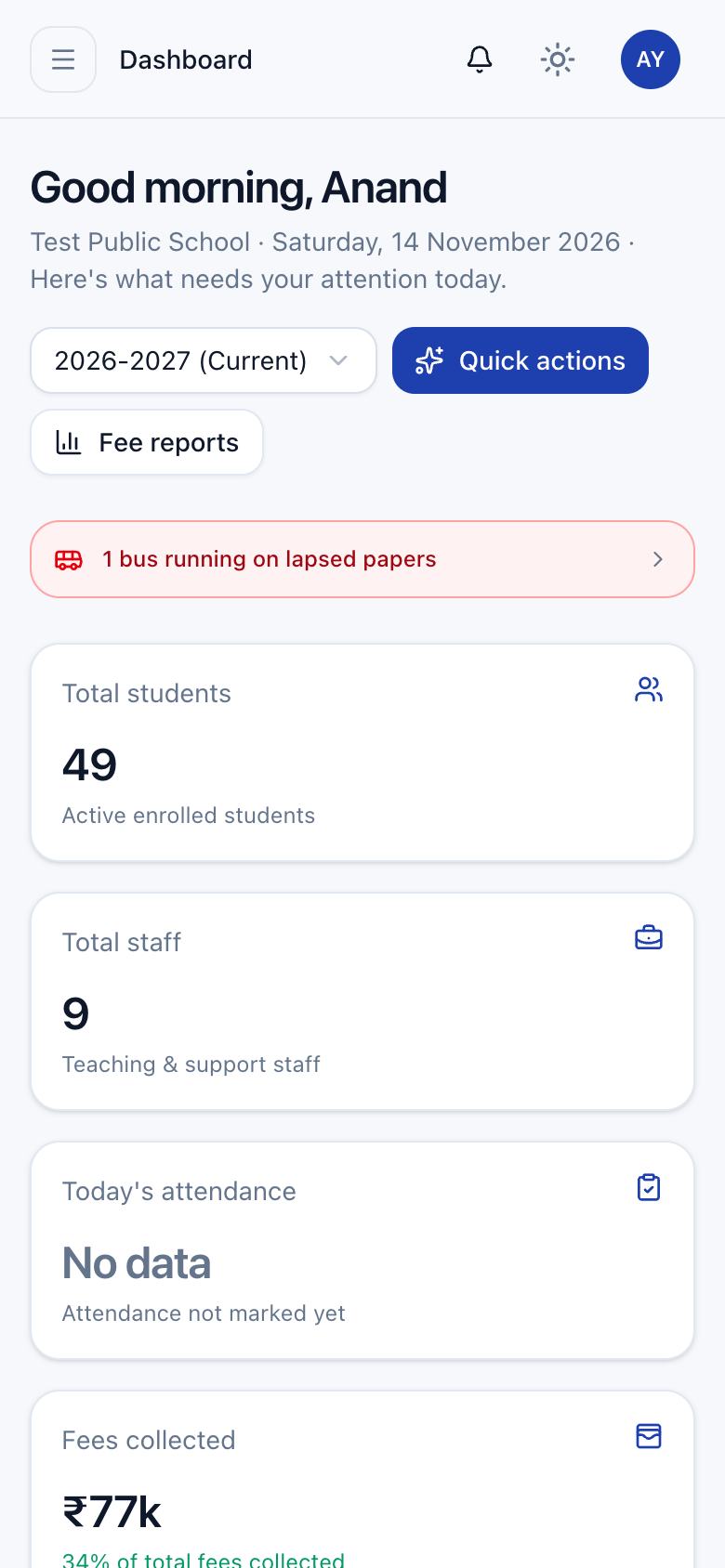
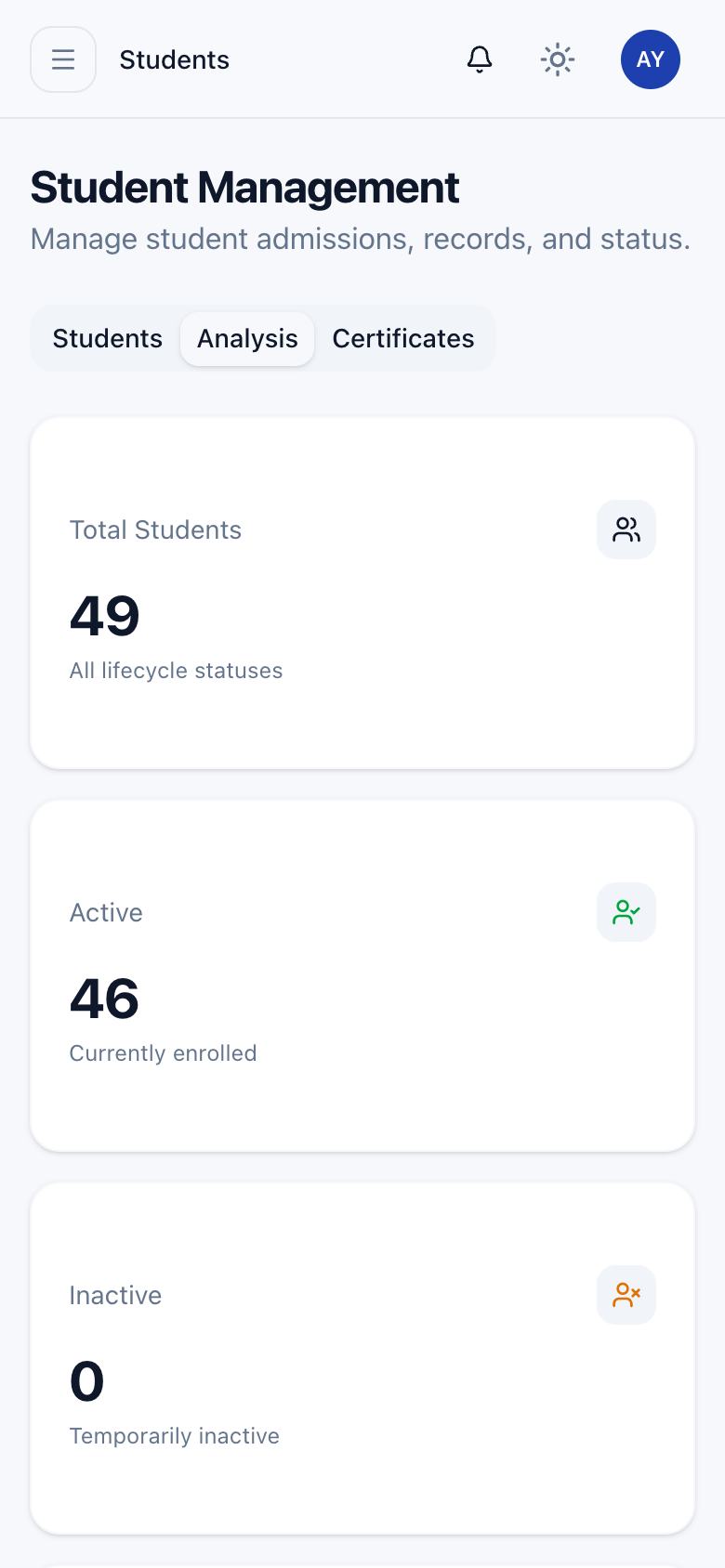
These are real screens from the app, in your school’s colours. Pick a module, or switch between light and dark.
Your whole school on one screen
Students, staff, attendance, fees, exams and leave on one screen, with alerts for anything that needs a decision today.
On every phone
On the phone in their pocket
Principals, teachers, students and parents get the full app in any phone browser, in light or dark. An Android app is on the way.
- Live dashboard on the go
- Student records anywhere
- Light and dark themes
- No install needed
Modules
From the first enquiry to the last report card
Each part of the school year has its own module, and they all share the same student records, so nothing gets typed in twice.
Admissions
Capture enquiries, manage applications and onboard students smoothly.
Student information
Centralized profiles, documents, history and progress in one place.
Attendance
Student and staff attendance with real-time summaries and alerts.
Fees & finance
Fee structures, collections, receipts and financial reporting.
Timetable
Build class timetables, set periods and breaks, print or share PDFs.
Assignments
Create assignments and quizzes, collect submissions, grade.
Exams & results
Plan exams, enter marks, publish report cards instantly.
Communication
Notices and announcements to the right groups instantly.
Staff & HR
Staff profiles, roles, attendance kiosk and payroll.
Leave management
Leave requests, approvals and balances for everyone.
Library
Issue and return, cataloguing and history tracking.
Transport
Routes, stops, fleet papers and student mapping.
Who uses it
A different screen for each person
The accountant doesn’t see marks, and parents only see their own child. Everyone gets the part of the school they deal with.
Principal & admin
Control and governance
Complete oversight with live strength, fee revenue, staff attendance and compliance.
- School-wide analytics and revenue dashboards
- Fee collection and pending dues tracking
- Staff attendance, payroll and leave approvals
- Enquiry-to-admission pipeline
- Role-based security and audit logs
Teachers & staff
Classroom hub
One-click attendance, assignments, marks entry and timetable in one focused workspace.
- One-click class attendance
- Homework and quiz publishing
- Exam marks and report cards
- Timetable for every class they teach
- Notices to parents and students
Students
Self-service progress
Homework deadlines, timetable, exam schedule, results and library in one dashboard.
- Daily timetable and subjects
- Online homework submission
- Results and performance trends
- Library and fee status
- Events calendar and notices
Parents
Real-time updates
Live attendance, fee receipts, report cards and notices for every child, in one login.
- Attendance updates
- Digital fee receipts
- Report cards and progress
- Transport details
- Leave requests and notices
Security
Your school’s data stays your school’s
Every login is tied to a role, important changes are logged with who made them, and backups run on a schedule.
- Permissions by role, so each person sees only their part
- Detailed audit trails and activity logs
- Automatic backups with data portability
- Secure sign-in and encrypted data in transit
Audit ready
Every action recorded with who did it and when.
Access control
Granular permissions for admins, teachers, students and parents.
Automatic backups
Designed for recovery and continuity.
Multi-school
Each school's data is kept fully separate.
Getting started
Four steps, and you’re live
We fit the setup around your academic calendar, so classes carry on as normal while it happens.
Step 1
Discovery call
We map your modules, workflows and data sources with you.
Step 2
Data import
Students, classes, sections and fee structures, uploaded for you.
Step 3
Staff training
Live walkthroughs for admins, teachers and key staff.
Step 4
Go live
Assisted roll-out with dedicated support from day one.
From schools
What principals tell us
A few words from school heads, next to what the app does for them each day.
“Fee collection used to take our office the whole first week of every month. Now receipts go out instantly and I can see pending dues class by class in one screen.”
Receipts the moment fees are paid
Every payment produces a numbered receipt straight away, whether it was cash, UPI, cheque or a bank transfer.
Know who owes, oldest first
Dues grouped by age so the office follows up on the right families first.
A whole class marked in one tap
Mark everyone present, then change only the few who are absent or late.
Staff check in at the kiosk
A face-recognition attendance kiosk records staff arrival without registers.
“Every morning I open the dashboard and know exactly where we stand — strength, attendance, fees and birthdays. It has made our administration calm and organised.”
Report cards ready to print
Marks become report cards in ready-made designs, class by class.
Re-evaluation, handled in-app
Requests, revised marks and final results stay in one auditable flow.
Timetable PDF in one click
Print or share a clean weekly timetable for any class and section.
See every teacher's weekly load
Periods per teacher at a glance, so no one is overloaded.
“Report cards that took our teachers days are now ready in minutes. Marks entry is simple, and parents get results the same day we publish them.”
No enquiry forgotten
Follow-ups due today and overdue are counted right in the menu.
Transfer certificates in minutes
Generate, number and print TCs from the student's existing record.
Digital ID card for every student
Printable ID cards with photo, class and admission number.
Alerts before bus papers lapse
Fitness, insurance and permit dates are tracked, with a warning on the dashboard.
“Teachers mark attendance in seconds and parents are informed right away. The support team set everything up for us and is always one WhatsApp message away.”
Leave requests without paperwork
Staff and students apply online; approvals and balances update themselves.
Notices reach the right class
Send to the whole school, a class or a few families, on the web and on phones.
Birthdays never missed
This week's student and staff birthdays show up on the dashboard.
Every school's data kept separate
Role-based access means each person sees only what their role allows.
Questions
What schools ask us first
If your question isn’t here, call or message us. We’d rather talk it through.
Is the software cloud-based and secure?+
Yes. Access depends on each person’s role, data is encrypted in transit, changes are logged, and backups run regularly.
Which modules are included?+
Admissions, academics, attendance, timetable, exams and results, assignments, fees, communication, leave, library, transport, staff and payroll, ID cards and more.
Can multiple staff members use it at the same time?+
Yes. The whole staff can be logged in at once, and each person only sees what their role allows.
How long does implementation take?+
Usually a matter of days. We go through four steps with you: understanding how your school works, importing your data, training staff, and staying close for the first days live.
Is there a mobile app?+
Skolynx works on any smartphone or tablet browser today, for admins, teachers, students and parents. A dedicated Android app is launching soon.
What kind of support do you provide?+
Dedicated onboarding support and ongoing help via call, email, and WhatsApp at +91 8130272619.
Do you offer live demos for school admins?+
Yes. We go through the parts that matter to your school, using your own way of working, and answer questions as we go.
See it with your school in mind.
We’ll walk you through the app using your school’s way of doing things, and answer whatever you ask.